\mathsf{L∃∀N}-verified Quantum Information Theory
-
RRS to QIC891, Fall 2026
-
Lecture 2, 2026-09-17
\Gamma ⊢ t : T
Lecture logistics (but quickly)
-
Repository is public; compiles slides into a page
-
Space Room
-
Next Tuesday, 22nd
-
-
Sky Room
-
Next Thursday, 24th, and the last Thursday, 1st Oct
-
-
Time Room
-
Next Tuesday, 29th
-
-
PSI Room Office hours: 12pm to 1pm
Compiled Lecture 1
Today's summary
-
Git basics
-
Lean installation on VSCode
-
Using Lean, and the Lean InfoView in VSCode
-
Reading basic syntax; continuing from Lecture 1
Version control with Git
-
Why do we need it?
-
Mathlib, Physlib, Quantumlib are git repos
-
-
What is it generally used for?
-
Software development
-
Collaborative projects
-
git or Github?
-
gitis a version control software-
Documentation: https://git-scm.com/
-
To learn more:
-
-
Github is a platform that uses and integrates
gitwith other services:-
hosting,
-
project management,
-
issue and bug tracking,
-
community integration, etc.
-
Basic concepts of git and everyday commands
-
git ...-
clone -
status -
add,commit, andpush -
pullandmerge
-
-
Repository (repo), Remote, Commits, Branches
-
Example use: Repo for this course, versioning its codebase and slides
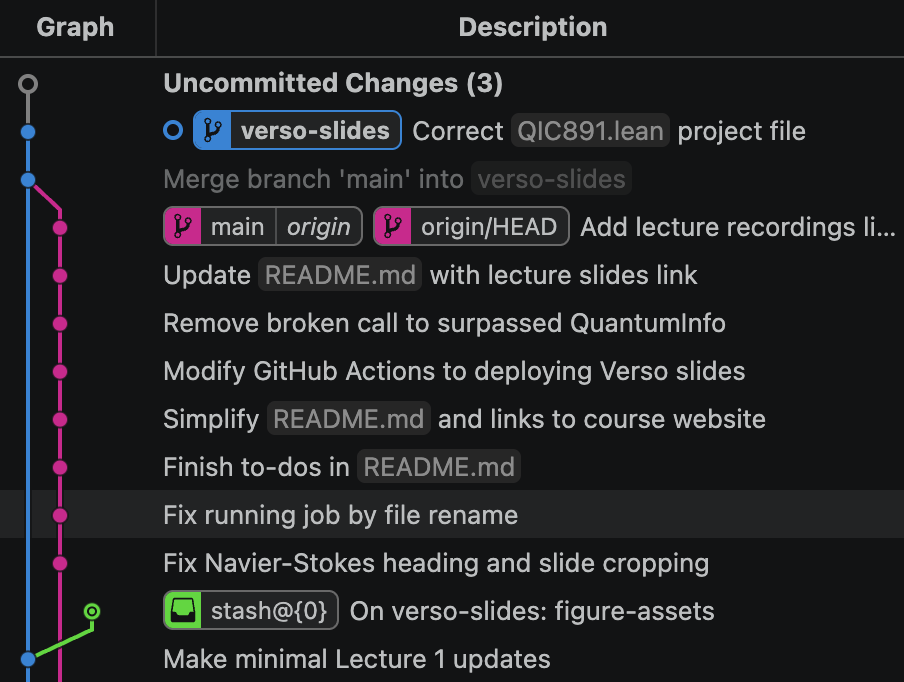
Git in the terminal
$ git show $(git ls-tree MERGE_HEAD -- QIC891.lean Qic891.lean | awk '{print $3}') > QIC891.lean
$ git status
  On branch verso-slides
  All conflicts fixed but you are still merging.
    (use "git commit" to conclude merge)

  Changes to be committed:
          new file:   .github/workflows/deploy-slides.yml
          deleted:    .github/workflows/lean_action_ci.yml
          modified:   Main.lean
          deleted:    QIC820-2025/QIC820-2025.lean
          modified:   QIC891/Basic.lean
          deleted:    Qic891.lean
          modified:   README.md

  Untracked files:
    (use "git add <file>..." to include in what will be committed)
          QIC891.lean

$ git add QIC891.lean
Basic concepts of Github
Example use: Providing you access to this course's repo!
Fork → Branch → PR workflow
-
Fork
-
git cloneremote repo hosted in Github to a new one of your own -
Example use: the remote repo may be 3rd-party, and you want to contribute
-
-
Branch
-
Run
git branch devto create a new branch calleddev -
Example use: writing new code that's not ready to be further integrated
-
-
Pull-Request (PR)
-
You push your new
devbranch to a remote, that receives it as a pull request, to eventually be merged -
Example use:
-
You can contribute to these lectures!
-
Overarching goal behind our assignment project
-
-
VSCode
-
VSCode: not necessary, but sufficient
-
Provides basic
-
gitand Github support, -
extensions for both,
-
and extension for Lean
-
-
Graphical interface and automatic for all of these tools
Creating and cloning projects
-
elan-
Toolchain management: can install different versions for each project
-
-
lake-
Compilation management
-
lake new-
starts a new project
-
-
lake update-
reads the manifest and toolchain again for modifications
-
-
lake build-
compiles downloaded files
-
-
lake exe cache get-
is used to download pre-compiled files
-
-
The Lean InfoView in VSCode
-
Opening a
.leanfile -
Touring the infoview
-
Goal state
-
#check,#eval,#print
-
-
Errors (red) and warnings (yellow)
Reading Lean's syntax and type theory
-
Recall
variable {x : ℝ}
#check x -- as declared above, x is of type ℝ
/- type judgment is defined to output the RHS -/
#check (x : ℝ)
#check (Set ℝ)
-- the set built from type ℝ is another data term in Type
#eval 2 + 2
#eval (2 : Int) + 2
#print axioms Real
Lean coding
-
Anatomy of a
def/theorem-
Name, type, and term
-
-
Term mode vs tactic mode
-
Tactics bread and butter
-
intro,use -
apply,exact -
ring,simp -
sorry
-